Scale from Zero to Millions of Users
A walk through how a single-server app grows into a system serving millions — load balancing, database replication, caching, CDNs, a stateless web tier, multiple data centers, message queues, and sharding.
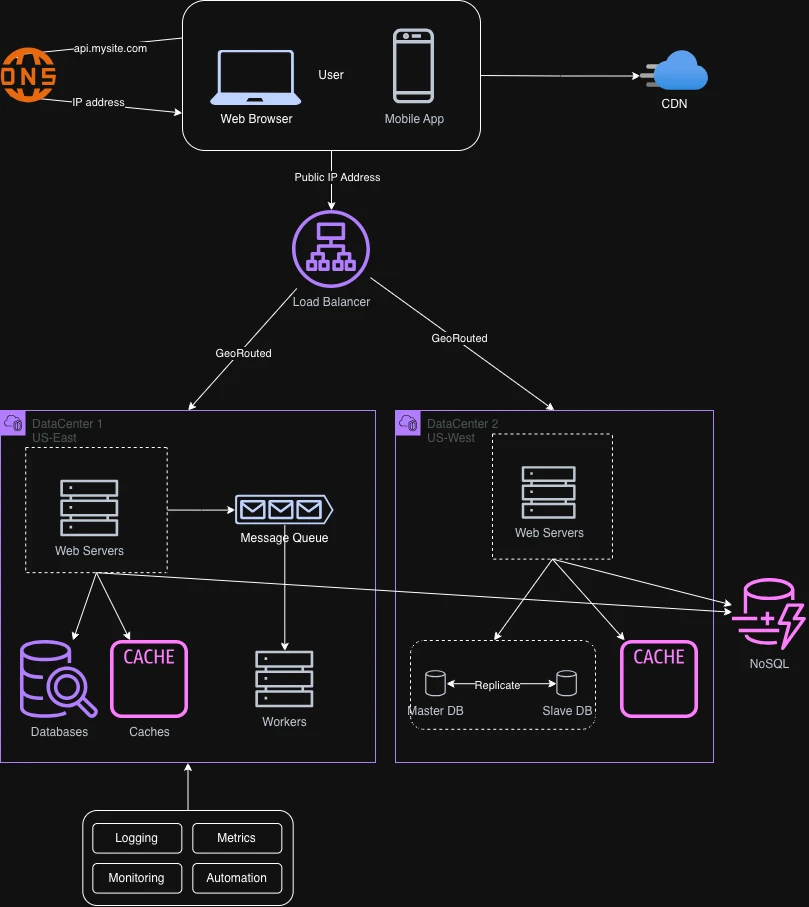
Single server setup
Let's start with something simple: everything running on a single server.
- Users reach the website through a domain name. DNS (the Domain Name Service) is usually a paid, third-party service rather than something we host ourselves (www.domain.com).
- DNS returns the Internet Protocol (IP) address to the user's browser or app.
- With the IP address in hand, HTTP requests are sent directly to our web server.
- The web server serves the HTML page or JSON response that gets rendered.
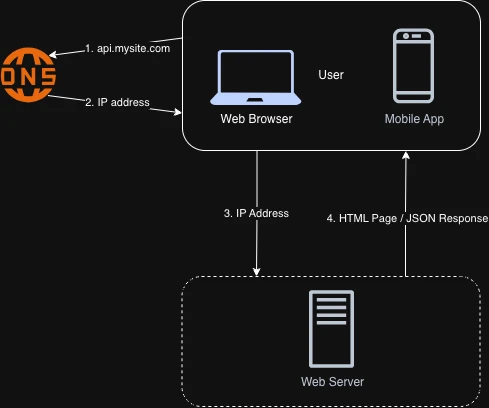
Database
As the user base grows, one server isn't enough, and we need more than one. One handles web and mobile traffic, another runs the database. Separating the two lets them scale independently.
Vertical scaling vs Horizontal scaling
Vertical scaling is scaling up: adding more power (CPU, RAM, and so on) to a server. Horizontal scaling is scaling out: adding more servers to the pool of resources.
When traffic is low, vertical scaling is a great option and a simple one, but it comes with serious limitations:
- Vertical scaling has a hard limit. You cannot add unlimited CPU and memory to a single server.
- It offers no failover or redundancy. If that one server goes down, the entire app goes down with it.
Horizontal scaling is preferred for large-scale applications precisely because of those limits.
Load balancer
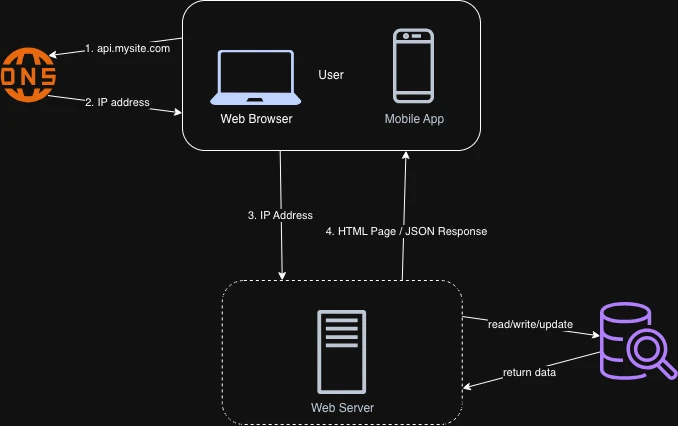
In this current design, users connect to the server directly. If the server goes offline, users cannot reach the app. In another scenario, if many users access the app at the same time and push the server past its load limit, they generally get slow responses or fail to connect at all. A load balancer, combined with horizontal scaling, is the best way to address both problems.
A load balancer evenly distributes incoming traffic across the web servers in a load-balanced set.
Users now connect to the load balancer's public IP directly, and the web servers are no longer reachable from the internet. For better security, private IPs are used for communication between the servers and the load balancer on the same network, which are unreachable over the internet.
- If server 1 goes down, the load balancer routes all traffic to server 2. The app stays online.
- If traffic grows rapidly and two servers aren't enough, the load balancer handles it gracefully. Add more servers to the pool and it automatically starts sending them requests.
Database replication
The servers look good — but what about the data?
Database replication is used across many database management systems, usually with a master/slave relationship between the original (master) and its copies (slaves).
A master database generally supports only write operations. A slave database receives copies of the data from the master and supports only reads.
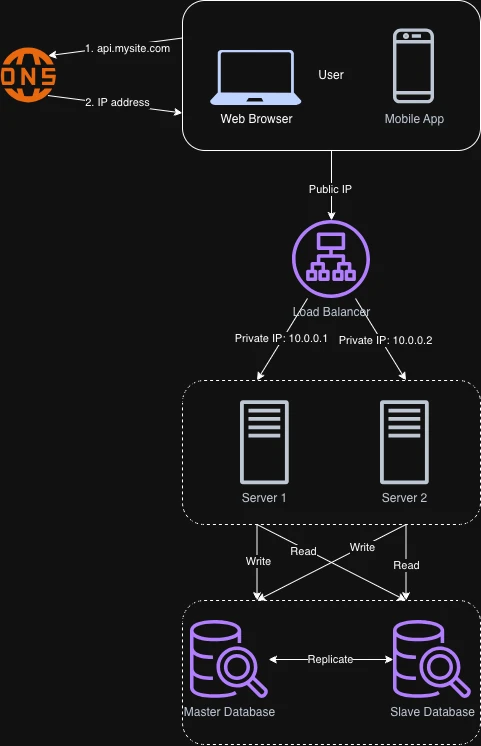
The advantages of database replication:
- Better performance: it allows more queries to be processed in parallel.
- Reliability: if one database server is destroyed by a natural disaster, the data is preserved. Nothing is lost because it is replicated across multiple locations.
- High availability: because the data is replicated across locations, the app stays operational even if one database is offline — it can read from another.
What happens when things fail:
- If the only slave goes offline, read operations are directed to the master temporarily. As soon as a new slave is up, it replaces the old one. With multiple slaves available, reads are redirected to the other healthy slaves, and a new server replaces the damaged one.
- If the master goes offline, a slave is promoted to be the new master temporarily. In production, promoting a slave to master is complicated: a slave's data may be stale, so a recovery script is needed to recover the missing data.
Cache
A cache is a temporary storage area that holds the results of expensive responses or frequently accessed data in memory, so subsequent requests are served faster. Repeatedly calling the database hurts application performance, and a cache mitigates that.
Cache tier
The cache tier is a temporary data-store layer that is much faster than the database. Its benefits include better system performance, reduced database load, and the ability to scale the cache tier independently.
After receiving a request, a web server first checks whether the cache has the response. If it does, it sends it back to the client. If not, it queries the database, stores the response in the cache, and sends it back. This strategy is called read-through caching.
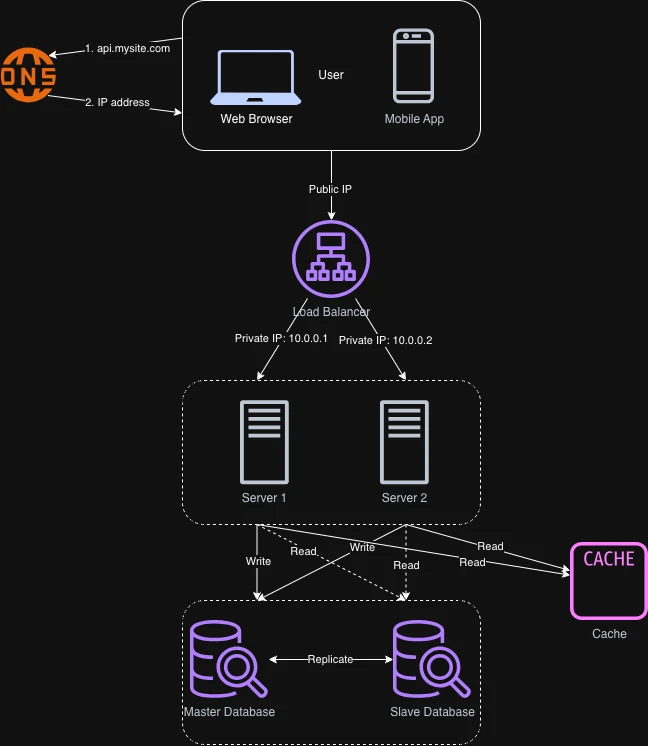
Things to consider when using a cache system:
- Use a cache when data is read frequently and modified infrequently. Cache data lives in volatile memory, so a cache server is not a good place to persist data — if it restarts, all the data in memory is lost.
- Expiration policy: it is good practice to set one. Once cached data expires, it is removed from the cache; with no policy, it is stored permanently. Don't make the expiry too short, or the system reloads from the database too often; don't make it too long, or the data goes stale.
- Consistency: this means keeping the data store and the cache in sync. Inconsistency can arise because data-modifying operations on the store and the cache are not part of a single transaction.
- Mitigating failures: a single cache server is a single point of failure (SPOF) — a component whose failure stops the entire system from working. Spread the cache across multiple servers in different data centers, and overprovision memory by a margin to leave a buffer as usage grows.
- Eviction policy: once the cache is full, any request to add items may remove existing ones — cache eviction. Least Recently Used (LRU) is the most popular policy; Least Frequently Used (LFU) and First In First Out (FIFO) are also used.
Content delivery network (CDN)
A CDN is a network of geographically dispersed servers used to deliver static content — images, videos, CSS, JavaScript files, and so on.
When a user visits the site, the CDN server closest to them delivers the static content. The farther a user is from a CDN server, the slower the site loads.
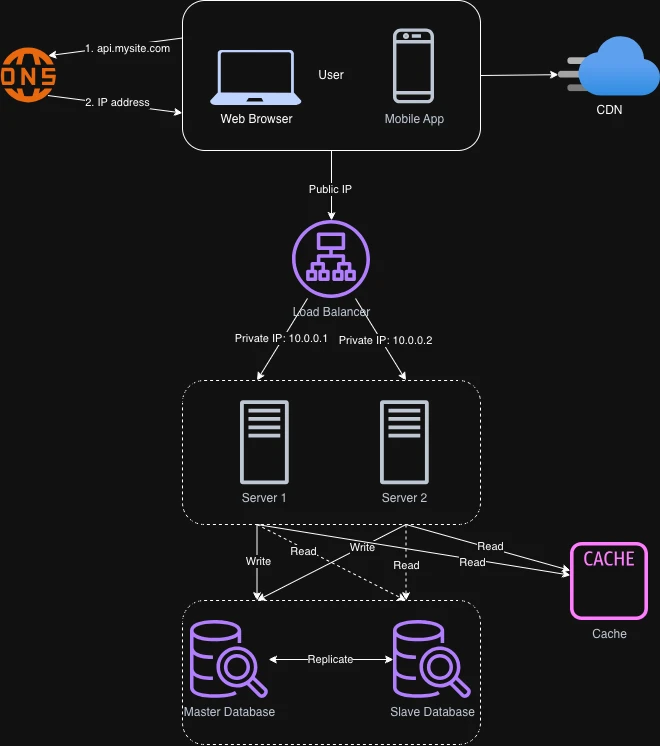
Things to consider when using a CDN:
- Cost: CDNs are run by third-party providers, and you are charged for data transferred into and out of the CDN.
- Setting an appropriate cache expiry: for time-sensitive content, setting an expiry time matters. The same cache-expiry rules from the cache section apply here.
- CDN fallback: decide how the site copes with a CDN failure. If the CDN has a temporary outage, clients should detect the problem and request resources from the origin.
- Invalidating files: you can remove files before their expiry by invalidating CDN objects through the API the vendor provides, or by using object versioning — adding a version parameter to the URL to serve a different version of the object.
Stateless web tier
Now it is time to scale the web tier horizontally. To do that, we move state (user session data) out of the web tier and into persistent storage such as a relational or NoSQL database. Every web server in the cluster can then access the state from that store. This is the stateless web tier.
A stateful server remembers client data (state) from one request to the next. A stateless server keeps no state information.
Stateful architecture
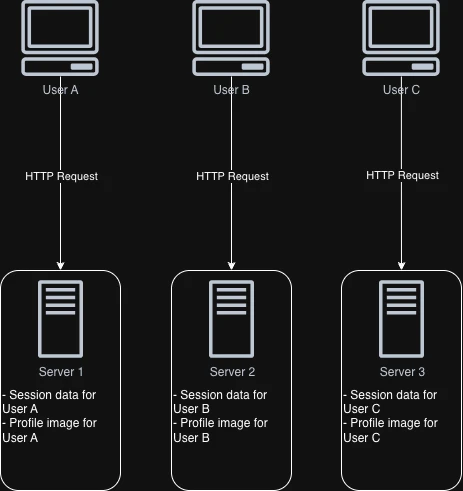
Here, User A's session data and profile data are stored on server 1. To authenticate User A, the HTTP request must be routed to server 1. If it is sent to another server such as server 2, authentication fails because server 2 does not have User A's session data.
The catch is that every request from the same client must be routed to the same server. Most load balancers can do this with sticky sessions, but that adds overhead, makes adding or removing servers much harder, and complicates handling server failures.
Stateless architecture
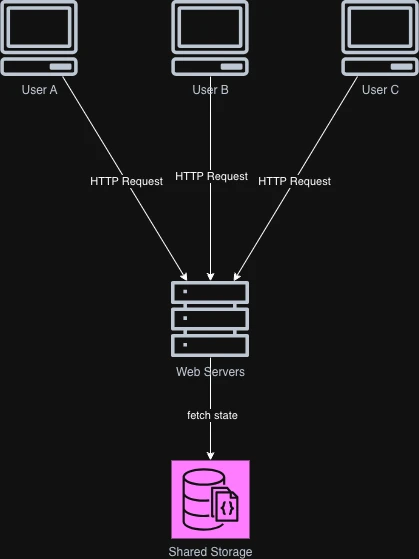
In a stateless architecture, HTTP requests from users can be sent to any web server, and each server fetches state data from a shared data store. The state lives in that shared store, out of the web servers. A stateless system is simpler, more robust, and easier to scale.
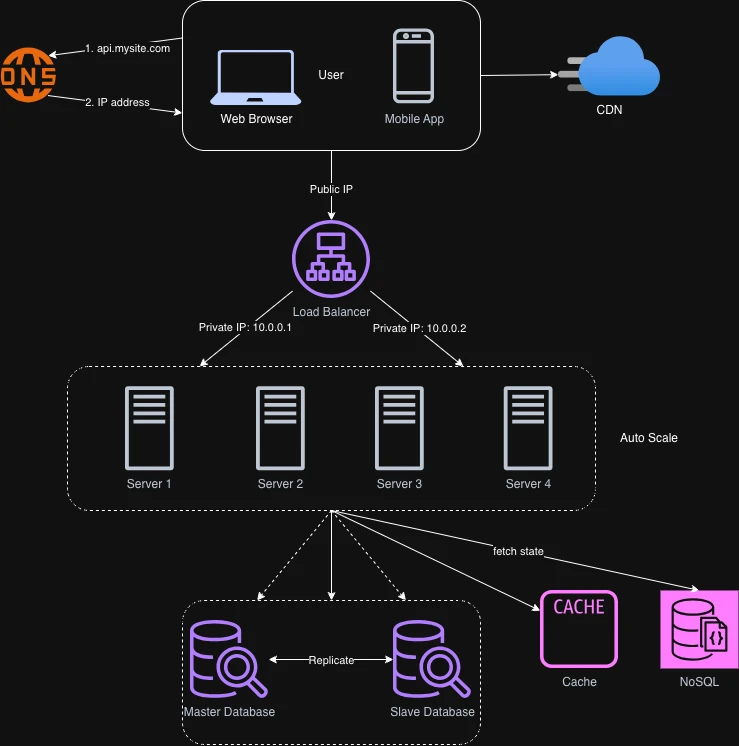
So we move the session data out of the web tier and into a persistent shared data store — a relational database, Memcached/Redis, NoSQL, and so on. NoSQL is often chosen because it is easy to scale. Autoscaling then adds or removes web servers automatically based on the traffic load.
Data centers
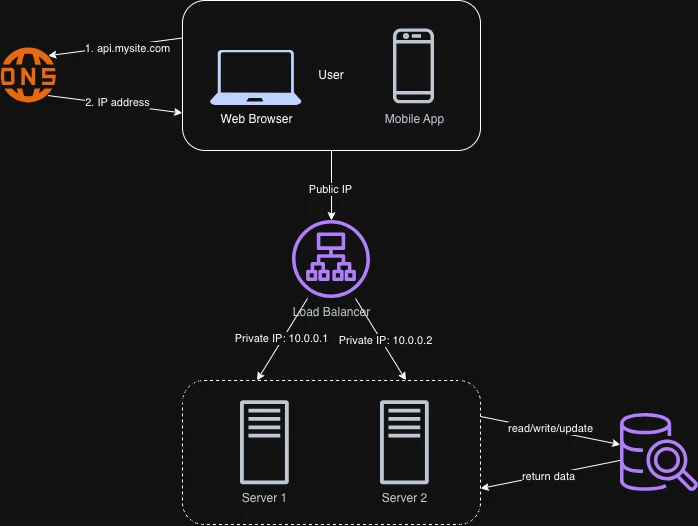
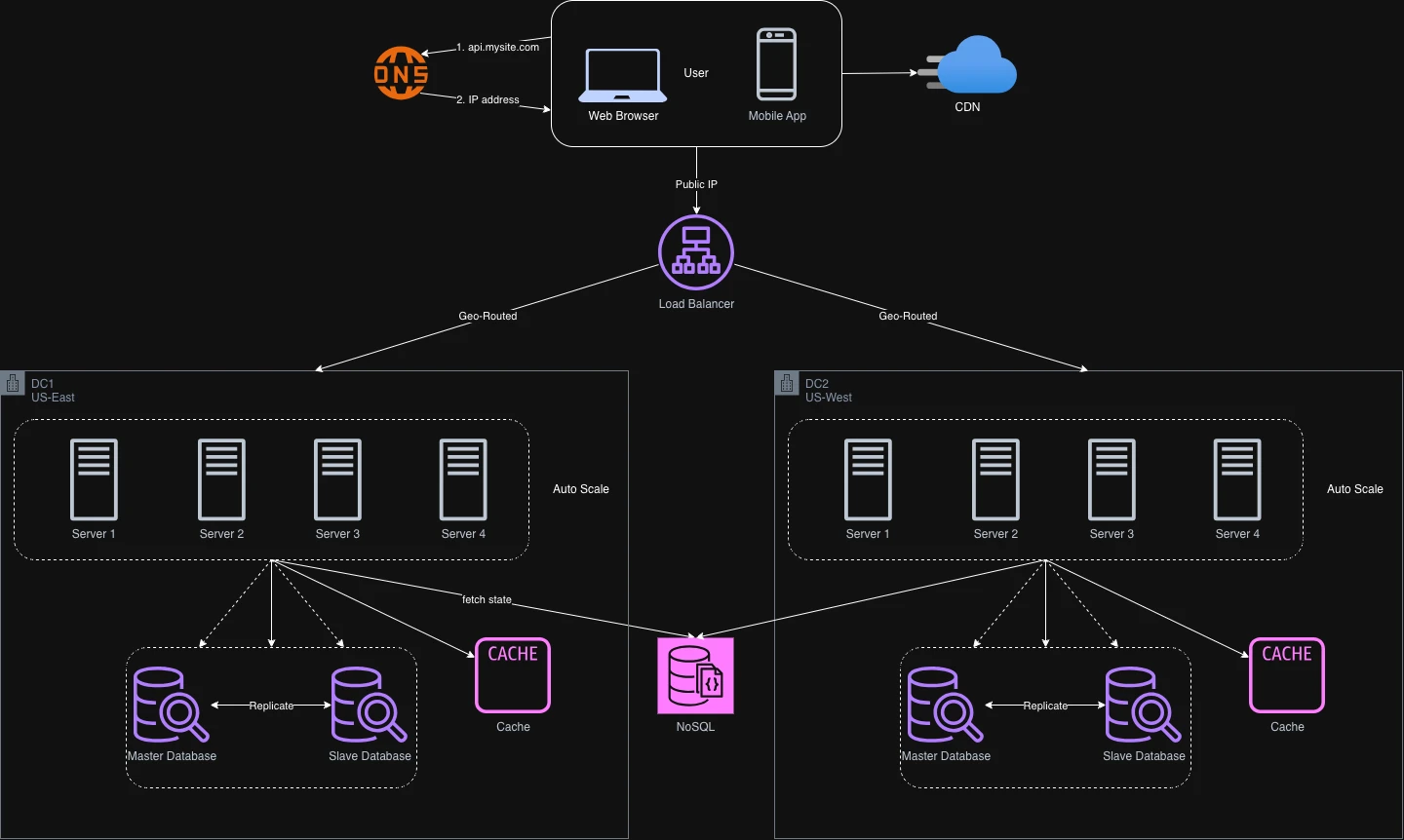
As the site grows rapidly and attracts users globally, supporting multiple data centers becomes crucial for availability and a good experience across wider geographic areas.
In normal operation, users are geoDNS-routed (geo-routed) to the closest data center, splitting traffic x% to data-center-1 and (100 − x)% to data-center-2. geoDNS is a DNS service that resolves domain names to IP addresses based on the user's location.
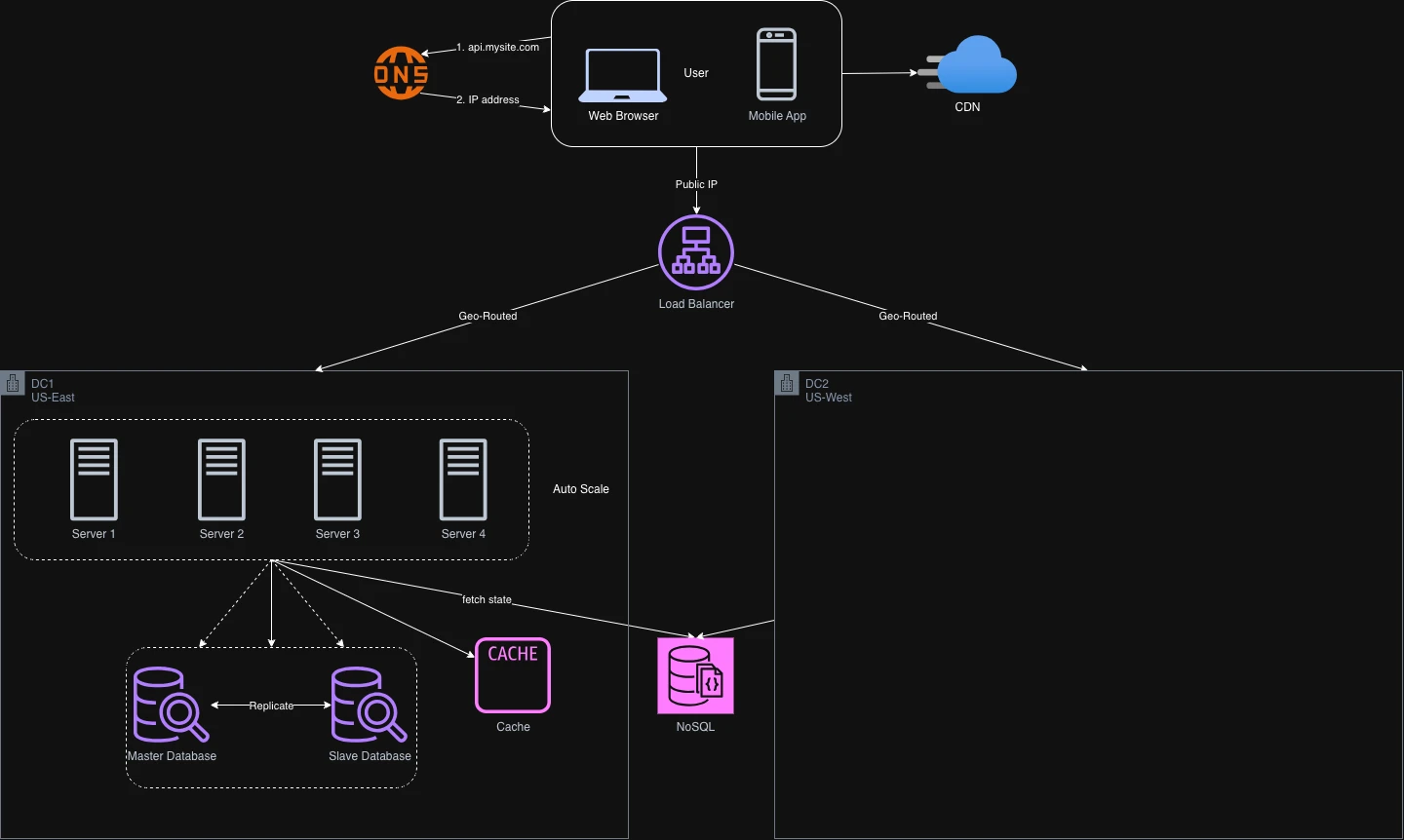
In a significant data-center outage, we direct all traffic to a healthy data center. Below, data center 2 (US-West) is offline and 100% of traffic is routed to data center 1 (US-East).
Several technical challenges must be solved to reach a multi-data-center setup:
- Traffic redirection: you need effective tools to send traffic to the correct data center. geoDNS routes users to the nearest one based on their location.
- Data synchronization: users in different regions may use different databases or caches. During failover, traffic might be routed to a data center where data is unavailable. A common strategy is to replicate data across multiple data centers.
- Test and deployment: automated deployment tools are vital to keep the service consistent across all data centers.
Message queue
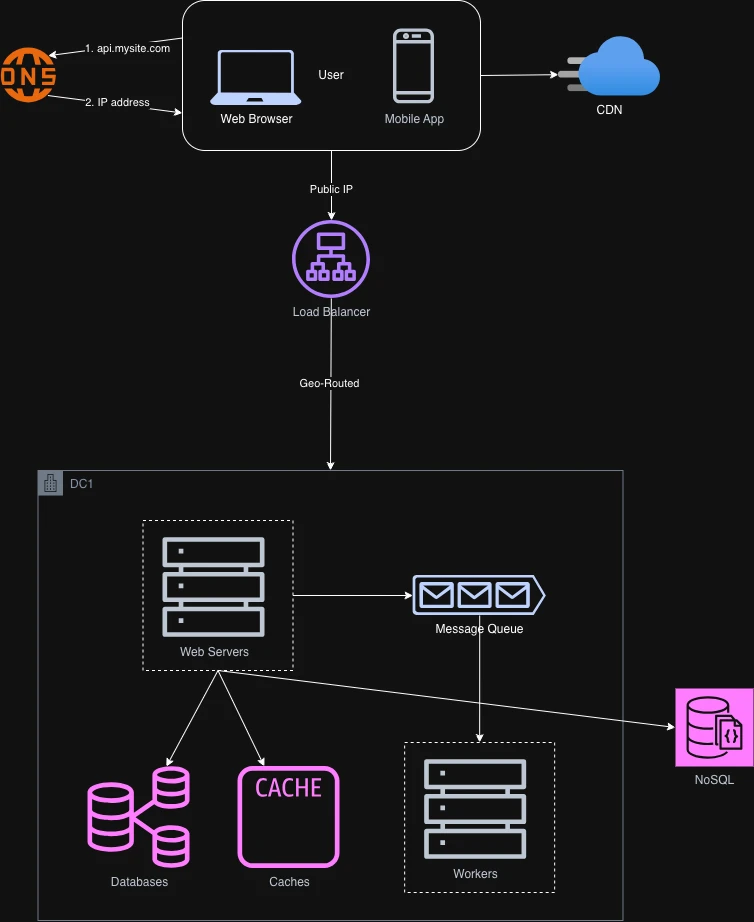
To scale further, we need to decouple different components of the system so they can scale independently. A message queue is a key strategy many real-world distributed systems use to solve this.
A message queue is a durable component, stored in memory, that supports asynchronous communication. It acts as a buffer and distributes asynchronous requests. The architecture is simple: input services, called producers (or publishers), create messages and publish them to a queue. Other services or servers, called consumers (or subscribers), connect to the queue and perform the actions defined by the messages.
Decoupling is what makes a message queue a good fit for building a scalable and reliable application. The producer can post a message while the consumer is unavailable to process it, and the consumer can read messages while the producer is unavailable. Producer and consumer can be scaled independently: when the queue grows large, add more workers to reduce processing time; when it is mostly empty, remove them.
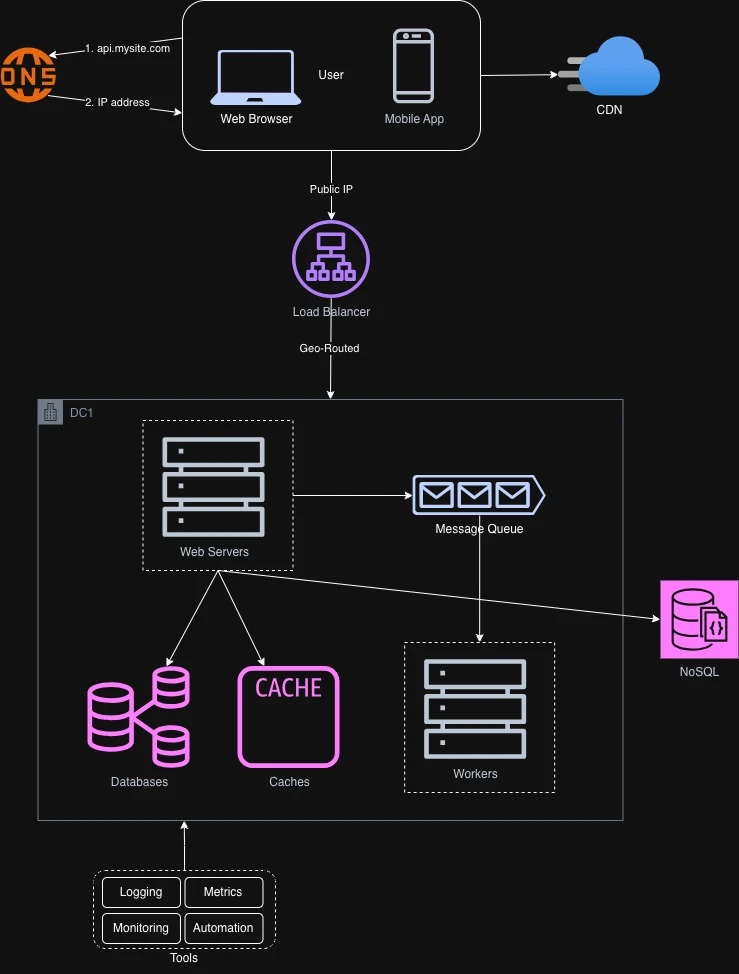
Logging, metrics, automation
Logging: monitoring error logs matters because it helps you identify errors and problems in the system. You can watch logs at the per-server level, or aggregate them into a centralized service for easy search and viewing.
Metrics: collecting different types of metrics gives business insight and reveals the health of the system.
- Host-level metrics: CPU, memory, disk, I/O, and so on.
- Aggregated-level metrics: the performance of the entire database tier, cache tier, and so on.
- Key business metrics: daily active users, retention, revenue, and so on.
Automation: as the system grows big and complex, build or adopt automation tools to improve productivity. Continuous Integration (CI) is a good practice.
Database scaling
Two approaches: vertical scaling and horizontal scaling.
Vertical scaling
Also known as scaling up, this means adding more power (CPU, memory, disk, and so on) to an existing machine. It comes with serious drawbacks:
- There are hardware limits to how much CPU, RAM, or disk you can add to a single server.
- A greater risk of a single point of failure.
- The overall cost is high — powerful servers are much more expensive.
Horizontal scaling
Also known as sharding, this means adding more servers. Sharding separates a large database into smaller, more easily managed parts called shards. Each shard shares the same schema, but the data on each shard is unique to that shard.
User data is allocated to a database server based on user IDs. Whenever you access data, a hash function finds the corresponding shard.
In our system we will have four shards, using user_id % 4 as the hash function to find the corresponding shard. If the result is 0, shard 0 is used to store and fetch data; if it is 1, shard 1 is used, and the same logic applies to the others.
The most important factor to consider when implementing a sharding strategy is the choice of the sharding key. The sharding key (also called the partition key) consists of one or more columns that determine how data is distributed. For our system, user_id is the sharding key. It lets you retrieve and modify data efficiently by routing queries to the correct database. When choosing one, the key criterion is that it distributes data evenly.
Sharding is a great technique to scale a database, but it is far from a perfect solution. It introduces new complexities and challenges:
- Resharding data: needed when a single shard can no longer hold more data due to rapid growth, or when one shard is exhausted faster than others because of uneven distribution. Shard exhaustion means updating the sharding function and moving data around; consistent hashing is a common technique for this.
- The celebrity problem: also called the hotspot-key problem. Excessive access to one shard can overload its server. Imagine the data for Linkin Park, Metallica, and Lady Gaga all ending up on the same shard — for a social application, that shard is overwhelmed with reads. The fix is to give each celebrity a shard of their own, and each of those may need further partitioning.
- Joins and de-normalization: once a database is sharded across servers, joins across shards are hard. A common workaround is to de-normalize so queries can run against a single table.
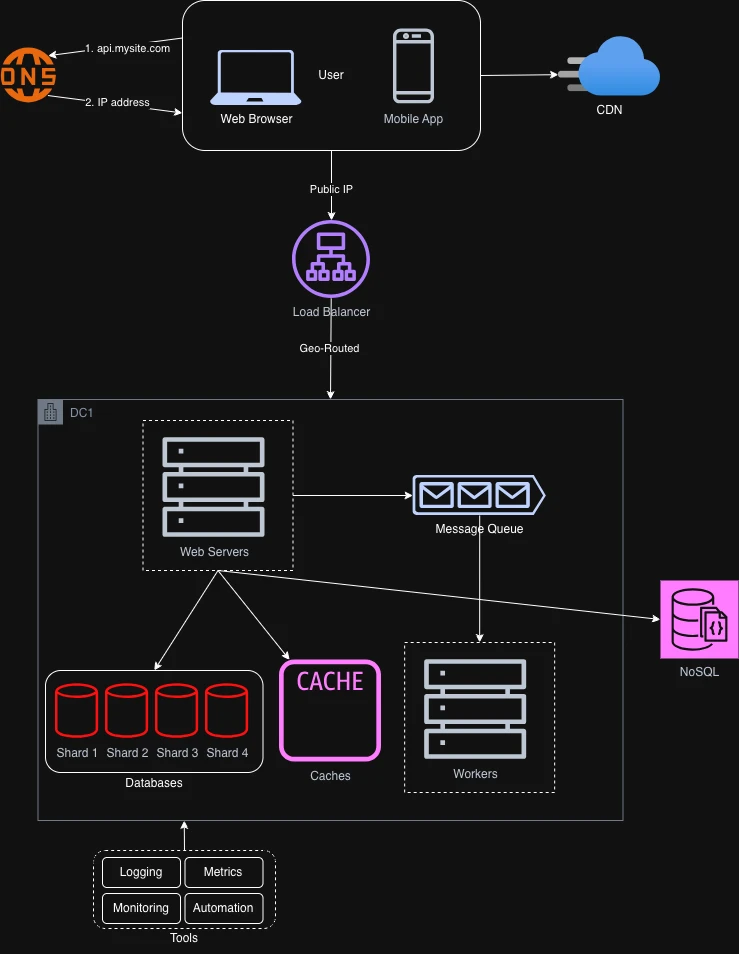
To support rapidly increasing data traffic, we shard the database. At the same time, some non-relational functionality moves to a NoSQL data store to reduce database load.
Millions of users and beyond
Scaling a system is an iterative process. More fine-tuning and new strategies are needed to go beyond millions of users — for example, optimizing the system and decoupling it into even smaller services. The key points:
- Keep the web tier stateless
- Build redundancy at every tier
- Cache data as much as possible
- Support multiple data centers
- Host static assets in a CDN
- Scale the data tier by sharding
- Split tiers into individual services
- Monitor the system and use automation tools